
Coupons, access codes and member trials
Give a percentage or a fixed amount off with a coupon, let new members try a paid community free for a few days, and know what access codes can and cannot do today.
On this page
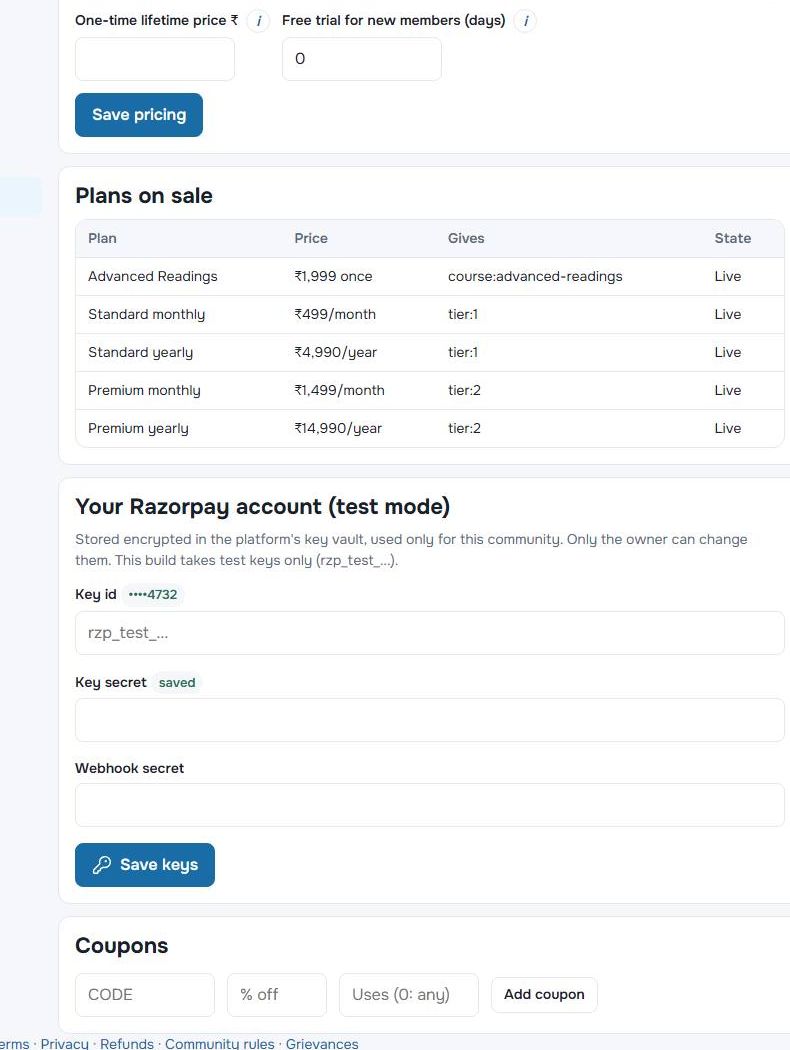
Three ways to let people in for less: coupons, a free trial for new members, and access codes.
Coupons
- Open Admin, Coupons.
- Type a Code (buyers type it at checkout), choose Percent off or Fixed amount off and How much off.
- If you want, set an expiry date, Uses in all (0 means any number) and Uses a person (1 by default).
- Under Works on, tick what it is for: courses, workshops, membership plans, payment links or downloads. Tick nothing and it works on everything.
- Choose Make the coupon.
The list shows each coupon with its discount, what it works on, how many times it was used and the total it took off. Buyers enter the code in Coupon (optional) at checkout. If they skipped it, Have a coupon? on the payment page takes it, one code per order. Where online payment is not set up yet, the checkout shows Have an access code or coupon? instead. A 100% coupon completes the order with nothing to pay, which is useful for a few guests. Every use is recorded in the ledger with the amount it took off, and the platform fee is worked out on what the buyer actually paid. Switch a coupon off at any time; its uses stay counted.
A free trial for new members
- In Admin, Pricing, set Free trial for new members (days), from 0 to 60.
- Click Save pricing.
A new member then gets the plan's access straight away for that many days, before any charge. If the community asks admins to approve members, the trial days count from when the person asks to join, not from the approval, so approve requests promptly. To keep access after the trial, the member pays from their billing page.
Access codes
The checkout already accepts access codes, but creating them is not in your community admin yet. Until it is, use one of these instead:
- a coupon at 100% with a small number in Uses in all (0: no limit), or
- Grant a course on a member's page in Admin, Members, for one person at a time.
For a group or a workshop, an invite link with an expiry date and a maximum number of uses is another option. Make one in Admin, Invites; see the article on inviting people.
We only count yes and no for each article. Nothing about you is stored.