
Set prices: free, monthly, yearly, tiers, lifetime, per course
Make the community free or paid, offer up to three tiers with monthly and yearly prices, add a lifetime price, and sell single courses.
On this page
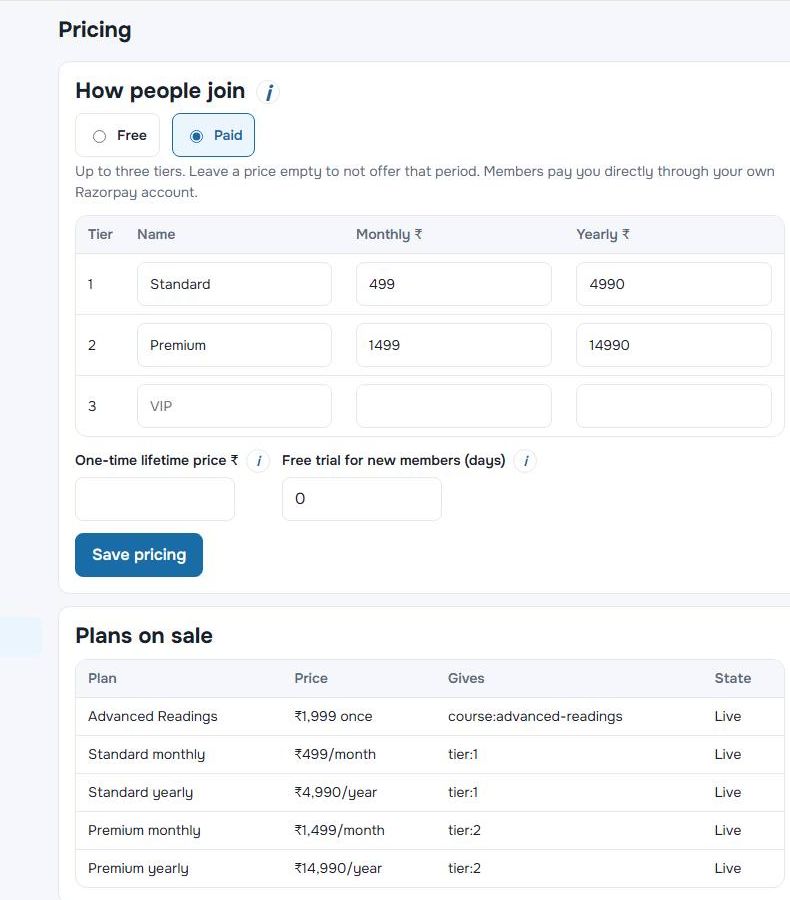
You set your own prices in rupees. Members pay you directly through your Razorpay account. All of this is in Admin, Pricing.
Free or paid
Under How people join, choose Free or Paid. A free community has no plans; anyone the doors let in can join. A paid community asks for a plan at the join step.
Tiers
A paid community can have up to three tiers, for example Standard and Premium.
- Give each tier a Name.
- Enter a Monthly ₹ price, a Yearly ₹ price, or both. Leave a price empty to not offer that period.
- Leave a whole row empty if you need fewer tiers.
- Click Save pricing.
A higher tier opens everything a lower tier opens. Use tiers to lock courses, categories and events (for example "Premium members").
Monthly and yearly plans renew by themselves
Monthly and yearly plans renew through Razorpay until the member stops them. Members can upgrade at once or move to a lower tier at the end of the period, from their billing page. There is no proration: an upgrade starts now at the new plan's full price.
Lifetime
One-time lifetime price ₹ sells access for good, with one payment. Leave it empty to not offer it.
A price for one course
To sell a single course, open it in Admin, Classroom, set Who can open it to One-time purchase and enter its price. Members buy it from the course card and keep it.
Check what is on sale
The Plans on sale table lists every plan the community sells: its price, what it gives (a tier or a course) and whether it is live. This is exactly what members can buy.
Good to know
- Prices are in rupees, including any GST you charge. Members can ask for a GST invoice at checkout by entering their business details.
- The platform fee for your plan is recorded on every sale. See the article on plans and fees.
- A new price applies to new purchases.
We only count yes and no for each article. Nothing about you is stored.