
Sales pages and paid workshops
Every course you sell has its own sales page, with the outcomes, the curriculum, you as the teacher, real reviews, questions and answers, and the price with GST included. A paid workshop is a one-time live class with seats, sold the same way.
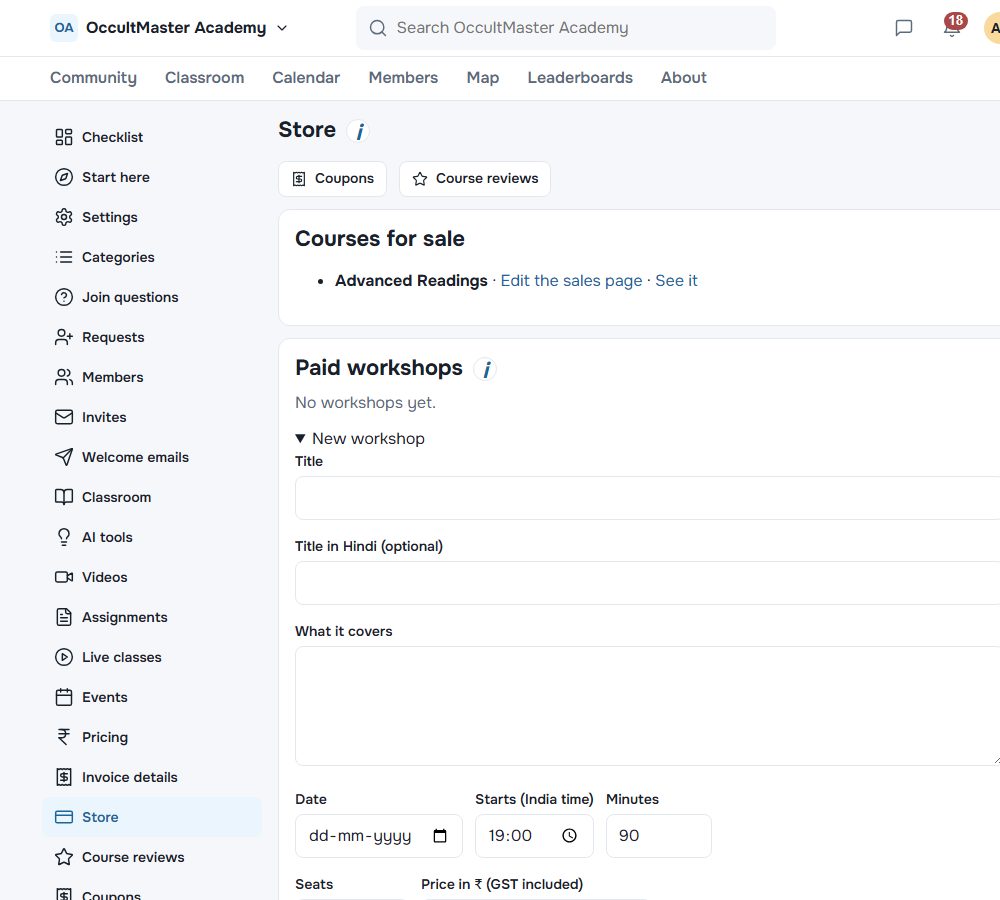
A sales page is the public page that explains a course and takes people to checkout. A paid workshop is a live class that happens once, for the people who bought a seat.
Your course's sales page
- In Admin, Classroom, set a course to be sold separately with a price. It now has a sales page at
/course/<its address>. - Open Admin, Store and choose Edit the sales page next to the course.
- Add a Headline (what a student can do at the end), What students will learn (one point a line), and Questions and answers: a line starting
Q:, then the answer on a line startingA:. - Choose the Teacher shown. Their name links to their public profile.
The title, picture, price and curriculum come from the course itself, so they never go out of date. Reviews come only from people who bought the course (see the article on course reviews). Buyers can type a coupon at checkout.
A paid workshop
- In Admin, Store, open New workshop.
- Give the title, what it covers, the date and time (India time), the length, the number of Seats and the Price (GST included).
- Choose Create the workshop. A live class is made for it under Admin, Live classes: make a stream key there before the day.
The workshop's page shows the seats left. A seat is held for half an hour while someone pays, so two people cannot buy the last one. After paying, the buyer gets the class page and a reminder before the start (24 hours by default). Only buyers and your team can open the workshop's live class.
On the workshop's own screen you see the seats sold, the buyers and the reminders queued. You can stop bookings, take them again, change the seats, or cancel the workshop and refund each buyer from Orders.
Files for sale and webinars
Selling files to download and webinar sign-up funnels are built and switched off for now. When the platform turns them on, they appear in Admin, Store.
We only count yes and no for each article. Nothing about you is stored.