
Webhooks (Pro plan)
Send member events to your own tools, and let another checkout invite members. Signed, retried, and logged. Works with Zapier and Make.
On this page
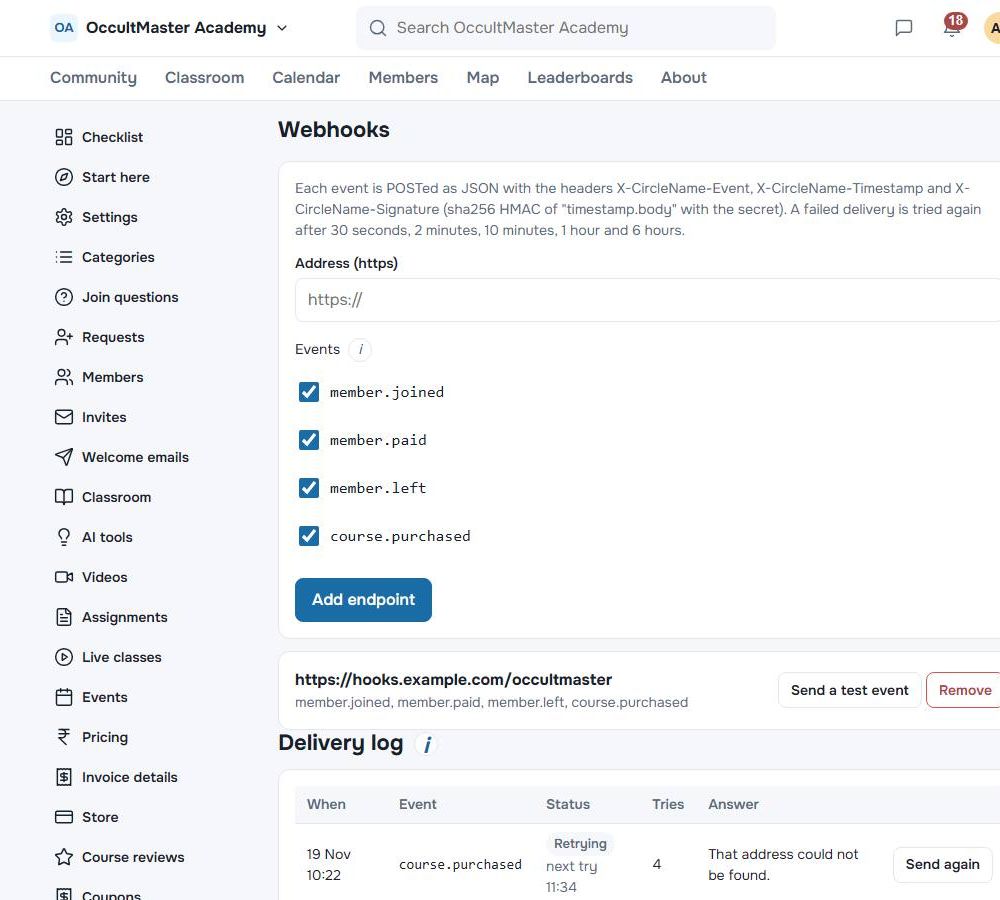
A webhook sends a message to an address you choose whenever something happens in your community. Use it to add buyers to your email tool, update a spreadsheet, or start an automation in Zapier or Make. It also works the other way: another checkout can tell your community to invite or add a member. Webhooks come with the Pro plan.
The events
| Event | When it is sent |
|---|---|
member.joined |
Someone becomes an active member |
member.paid |
A member's payment goes through, renewals included |
member.new_paid |
A member pays for a membership here for the first time |
member.left |
A member leaves the community |
course.purchased |
Someone buys a course on its own |
membership.answers |
Someone answers your join questions |
course.unlocked |
A course opens to a member: bought, given by an admin, or given through the incoming webhook |
Add an endpoint
- Open Admin, Webhooks.
- Under Outgoing, enter the Address (https) of the tool that will receive the events. It must be a public address; an address inside a private network is refused.
- Tick the Events you want.
- Click Add endpoint. The page shows the endpoint's signing secret once. Copy it into your receiving tool now; it is not shown again.
- Click Send a test event to check the connection. The test appears in the Delivery log a moment later.
In Zapier, use the trigger Webhooks by Zapier, Catch Hook and paste its address here. In Make, use Webhooks, Custom webhook.
What your tool receives
Each event is a POST with a JSON body and these headers:
X-Webhook-Event: the event nameX-Webhook-Delivery: the delivery's number, the same on every retryX-Webhook-Timestamp: the time it was sent, in Unix secondsX-Webhook-Signature:sha256=followed by the HMAC-SHA256 oftimestamp.body, made with your secret
Check the signature before trusting the message, and ignore messages whose timestamp is too old. Amounts are in paise.
Failures and retries
A reply with a 2xx status counts as delivered. Anything else, or no reply within 10 seconds, is tried again after 30 seconds, 2 minutes, 10 minutes, 1 hour and 6 hours. The Delivery log shows each delivery: when, which event, its status, the number of tries, your tool's answer and the next try. Send again resends one by hand. Older deliveries shows earlier pages.
Invite members from another checkout (incoming)
- Under Incoming, type your password if asked, then click Make a secret. It is shown once; keep it in the other checkout.
- The other checkout sends a signed
POSTto the address shown, with the same two headers (X-Webhook-Timestamp,X-Webhook-Signature) and a body like{"id": "order-1001", "type": "member.add", "data": {"email": "[email protected]", "courses": ["astro-basics"]}}. member.invitesends your usual email invitation.member.addmakes someone who already has an account a member at once, with the courses listed; someone without an account gets the invitation instead.
Each id is accepted once, requests older than 5 minutes are refused, and Received lists every event. Rotate the secret makes a new one and stops the old one at once.
Good to know
- Remove an endpoint with Remove; its deliveries stop at once.
- Webhooks are available on the Pro plan only. On Starter, the Webhooks screen says so and links to Creator billing, where you can switch to Pro.
We only count yes and no for each article. Nothing about you is stored.