
Affiliates: commission, invite links and recording payouts
Let members earn a share of what the people they invite pay you. You set the rate, they share their link, and you pay them yourself and record it.
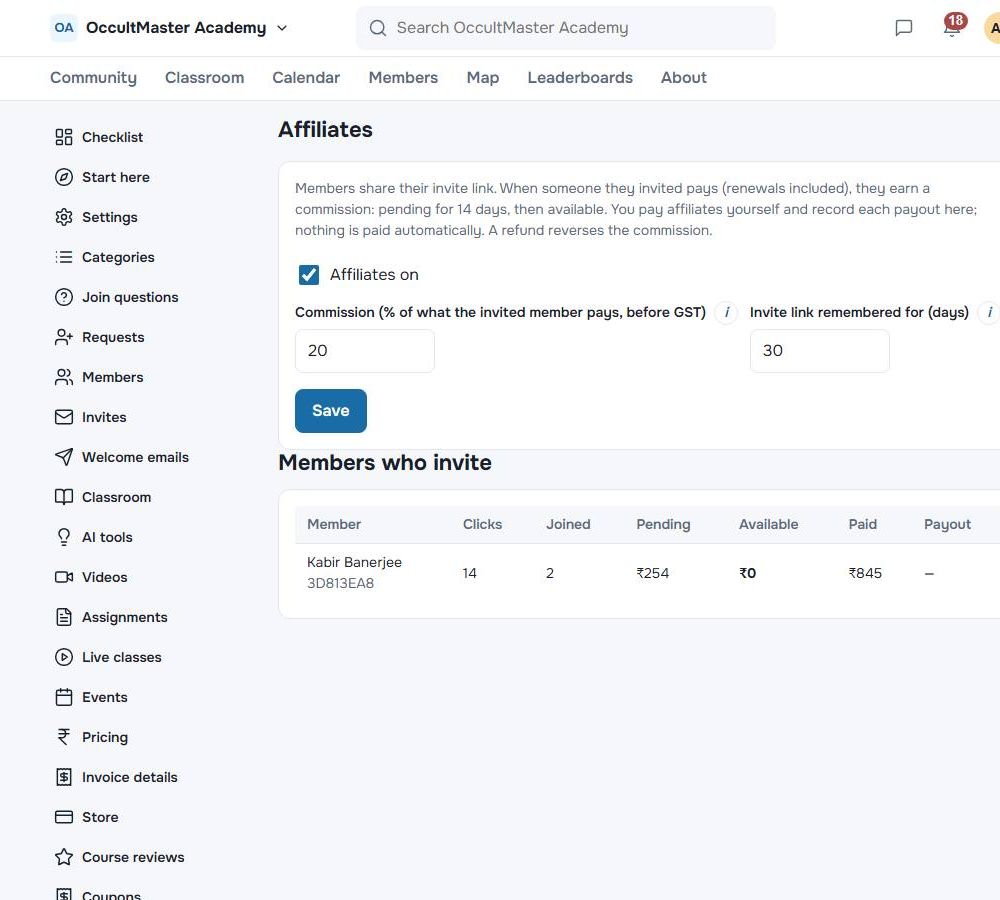
Affiliates turn your best members into your sales team. Every member has a personal invite link; when someone they invited pays, the member earns a commission.
Switch it on
- Open Admin, Affiliates.
- Tick Affiliates on.
- Set Commission: the percentage of what the invited member pays, before GST. It can be up to 50%.
- Set Invite link remembered for (days): how long after clicking a link a join still counts for the inviter.
- Click Save.
The rate starts at 0%. At 0%, invites are counted but nobody earns until you set a rate. Only the owner can change the rate and record payouts.
What members see
Each member has an Invite and earn page with their invite link and a Copy button. The link opens your About page with the join button. The page shows their clicks, how many joined, and their commission: Pending, Available and Paid to you.
How commission moves
- The invited person pays (the first payment and every renewal count).
- The commission is pending for 14 days.
- After 14 days it becomes available.
- If the payment is refunded, the commission is reversed. If it was already paid out, it is taken off the next payout.
Paying affiliates
Nothing is paid automatically. You pay affiliates yourself, for example by UPI or bank transfer.
- Pay the member their Available amount, for example by UPI.
- In Admin, Affiliates, find them under Members who invite.
- Enter the UPI or bank reference and click Record payout. Everything that was available is marked paid, and the page confirms the amount.
Good to know
- Commission is worked out on what was actually paid, after any coupon and before GST.
- Members cannot earn from their own purchases.
- Keep your own record of payouts for your accounts; the payout list here is a log, not a payment.
We only count yes and no for each article. Nothing about you is stored.