
Hindi communities: what is translated and what you write yourself
Choose Hindi and every menu, button, admin screen and email from the product is in Hindi. Your posts, courses, About text and rules are yours to write.
On this page
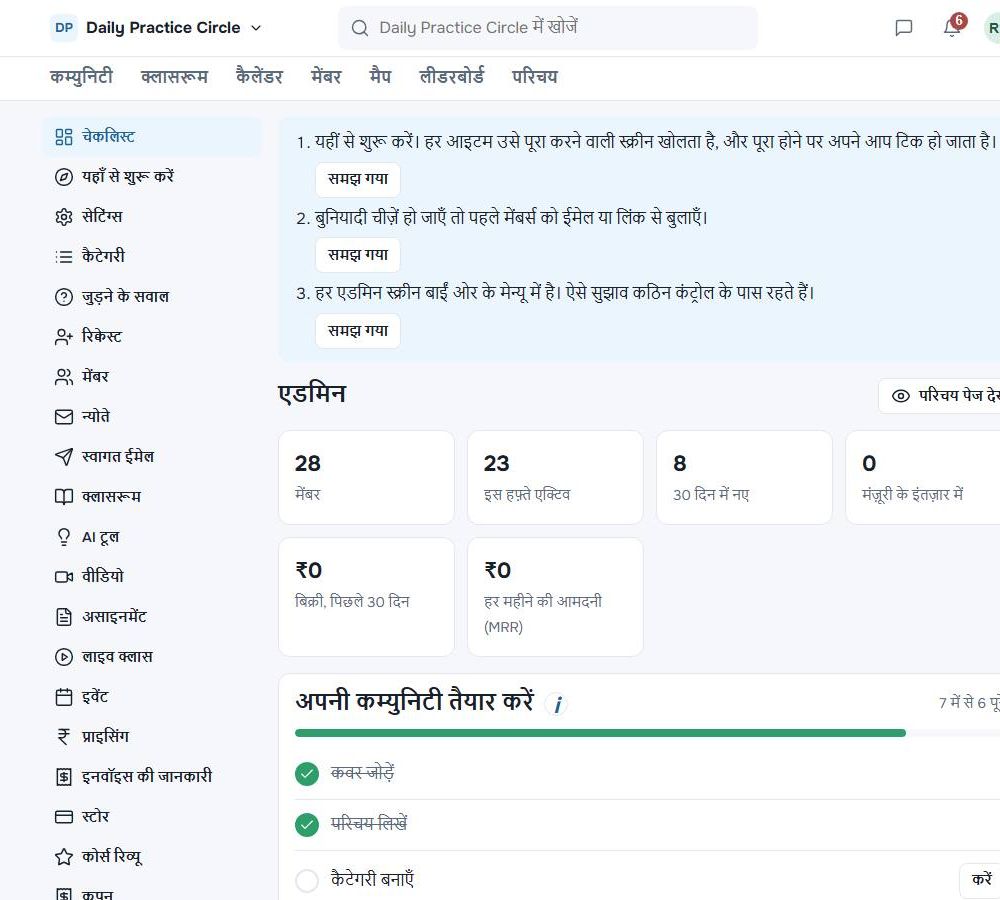
A community's language is set when you create it (Which language?) and can be changed later in Admin, Settings. It decides the language of everything the product itself says.
What the product shows in Hindi
- The top bar, the left rail (or the tabs) and the phone's bottom bar.
- The composer, post and comment actions, filters, members, leaderboards, calendar and classroom screens.
- The join flow, checkout and member billing.
- Notifications and the emails the product sends.
- The whole community admin, including settings, pricing and plugins.
- The default categories (घोषणाएँ, आम बातें, सवाल, जीत, परिचय) and level names (नए, खोजी, रेगुलर and so on). You can rename them.
Fonts are chosen for both scripts, so Hindi and English sit well together on every screen and at every phone width.
What you write yourself
- Your About text and rules.
- Posts, courses and lessons. Lesson blocks have English and Hindi fields side by side, so you can teach in one language or both.
- Event titles and descriptions.
- Your welcome message and join questions.
Search understands Hindi spelling
Hindi is often written in more than one way. Search treats common variants as the same word: हिन्दी finds हिंदी, फ़्री finds फ्री, with or without the nukta, chandrabindu or a half letter. This works for posts, courses and member names.
Members choose their own language too
Members can set their preferred language in My account, and the main site has English and हिंदी versions of every page.
A note on the Hindi wording
Every interface line has a Hindi version written as a draft. It is waiting for a native speaker's review, and some words may still change. If a word reads oddly to your members, tell the platform team.
We only count yes and no for each article. Nothing about you is stored.