
How points and levels work
You earn a point each time someone likes your post or comment. Points move you up nine levels, and higher levels can open courses, categories, events and chat.
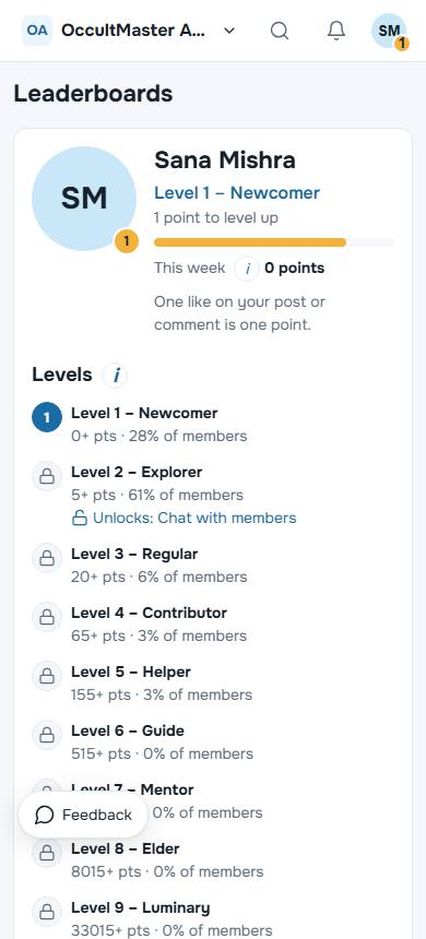
Points show who helps the most in a community.
Earning points
- When someone taps Like (the thumbs-up) on your post or your comment, you get one point.
- You cannot like your own post, so it never counts.
- If someone takes their like back, that point goes away. Your points never drop below zero.
Some communities use Helpful (a raised hand) instead of Like. It earns points in exactly the same way.
Points and levels are separate in each community you belong to.
Levels
There are nine levels. You move up as your points grow:
| Level | Points |
|---|---|
| 1 | 0 |
| 2 | 5 |
| 3 | 20 |
| 4 | 65 |
| 5 | 155 |
| 6 | 515 |
| 7 | 2,015 |
| 8 | 8,015 |
| 9 | 33,015 |
Each community can give its levels its own names. Your level shows as a small number on your picture everywhere in that community. You get a notification when you reach a new level.
In some communities the admins show a thin ring around each picture instead. The ring fills as you get closer to the next level; hover over it, focus it or tap it to see the number.
Why levels matter
A community can use levels to open things, for example:
- a course that "Unlocks at level 3",
- a category you can post in from a certain level,
- an event for members at a level,
- posting or chat, which some communities open from a level.
Comments are always open, so you can start earning from day one.
Your progress
Your profile in the community shows your level, your points and how many points you need for the next level. Leaderboards ranks members over 7 days, 30 days and all time and shows your own rank. The card beside the feed shows the top five of the last 30 days. Owners and admins are not ranked.
The best way to earn
Answer questions, share what you learned, post your wins. Posts that help others get liked.
We only count yes and no for each article. Nothing about you is stored.