
Post, comment, mention and vote in polls
Write a post with pictures, files, a video link or a poll; reply in comments; type @ to mention someone; vote and change your vote until a poll closes.
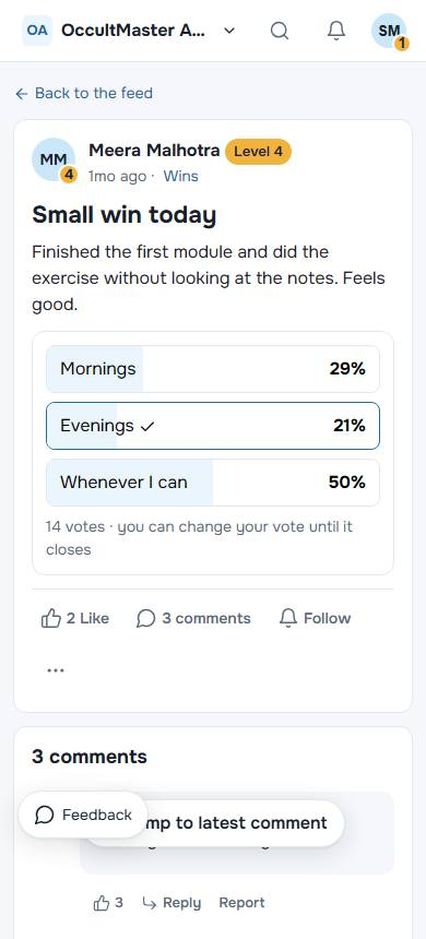
The Community tab is where the community talks. Here is everything you can do in it.
Write a post
- Tap Write something at the top of the Community tab. On a phone the composer opens full screen.
- Add a Title and your text. The small toolbar adds bold, italics, headings, lists, a quote or a link.
- Add up to 5 Images, up to 3 Files, or one YouTube or Vimeo link.
- Pick a Category.
- Tap Post.
Some categories open only at a certain level, and some are for admins only. A community can also decide that posting opens at a level; commenting is always open.
Comment and reply
- Write in Your comment under a post and tap Send. You can add one image.
- Tap Reply under a comment to answer it. Replies go one level deep, so threads stay easy to read.
In the feed, each post shows its likes and comments, the faces of the last few people who commented, and when the newest comment came, for example "New comment 2h ago".
Mention someone
Type @ and start typing a name, then pick the person from the list. They get a notification with a link to your post or comment.
Like
Tap Like (the thumbs-up) on a post or a comment that helped you. Each like gives its author one point. You cannot like your own post. Some communities show Helpful (a raised hand) instead of Like; it works the same way.
Polls
- In the composer, tap Poll and add 2 to 10 options. You can set a closing time.
- Members vote by tapping an option. The results show after you vote.
- You can change your vote until the poll closes.
Edit, delete or report
- Your own posts have Edit and Delete in the Post actions menu.
- If a post breaks the rules, use Report in the same menu, say what is wrong under What is wrong with it?, and tap Send to the admins.
- To report a comment, tap Report under it. It goes to the admins at once, without a reason.
The admins see every report and decide.
In a community that uses the names Discussions, Live and Progress, the Community tab is called Discussions. It works the same way.
We only count yes and no for each article. Nothing about you is stored.