
RSVP to a live class and add it to your calendar
Find live classes in Calendar, say you are going, add them to your own calendar, and join from the event page when the link appears.
On this page
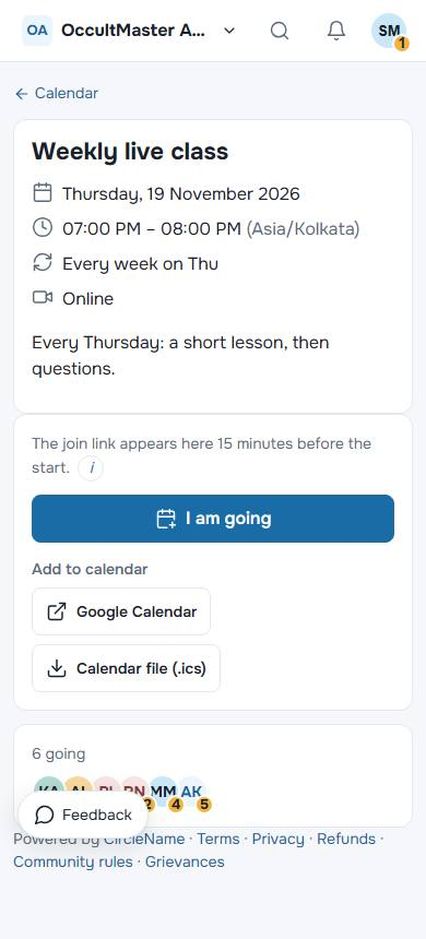
Live classes, Q&A calls and meet-ups are in Calendar (/calendar). In a community that uses the names Discussions, Live and Progress, the tab is called Live (/live). It works the same way.
Find an event
- Upcoming lists the next events. This is what you see first on a phone.
- Month shows a whole month; use Previous month and Next month to move.
- Times are shown in your time zone. If they look wrong, change your time zone in My account.
- An event may be online (a join link) or at a place (an address).
Say you are going
- Tap the event to open it.
- Tap the RSVP button. For a weekly or monthly event, you RSVP for each date separately.
- The page shows how many people are going.
Add it to your own calendar
On the event page:
- Google Calendar opens Google Calendar with the event filled in.
- The .ics file works with the iPhone, Android and Outlook calendars.
Reminders
If you said you are going, you get a reminder 24 hours and 1 hour before the start, by email and on the bell. You can turn the email off in My account, Notifications; the bell always shows it.
Joining
The join link appears on the event page 15 minutes before the start, and only for people who can attend. Before that, the page tells you when it will show. Open the event page a few minutes early and tap Join now.
If something changes
- If the time changes, your reminders follow the new time.
- If an event is cancelled, everyone who said they were going is told, and the page says "This event was cancelled."
Locked events
Some events are for a level, a tier or people who bought a course. The page says "This event is for members who meet its lock."
We only count yes and no for each article. Nothing about you is stored.